Custom Printed QR Code Inserts That Connect Your Brand
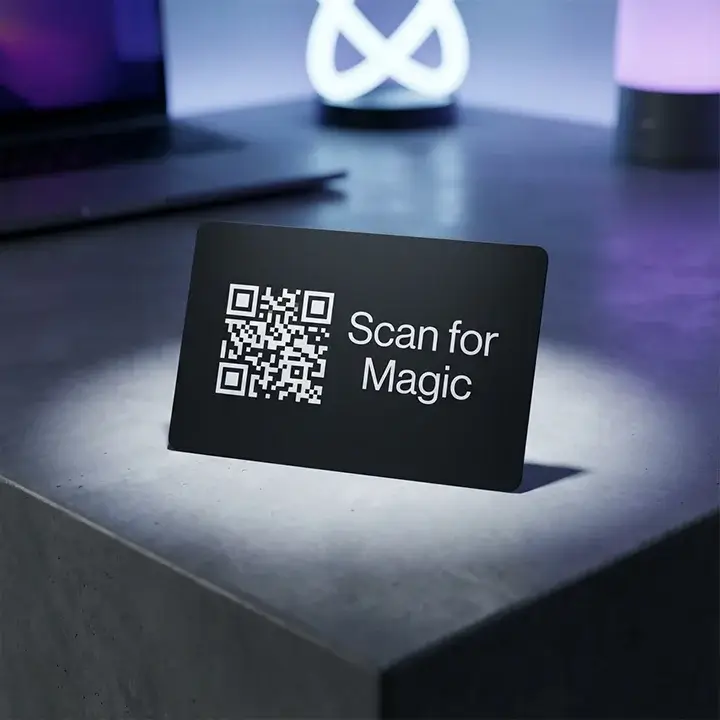
Our QR Code Inserts make it easy for customers to access your links by scanning a clear, high-contrast code on a quality card. With sharp printing, we avoid the scan failures that happen with home-printed codes, so your customers can quickly watch a setup video or leave a review right after opening their package.
- Free U.S. shipping • 8-10 business days turnaround
- Low Minimums
- 7-day returns
If you require a custom size or design, please specify your requirements in the form below. We will respond with a quote shortly.
| Feature | Specification |
|---|---|
| Material Weight | 14pt, 16pt, or 18pt Premium Cardstock |
| Finish Options | Scuff-Resistant Matte, Soft-Touch Laminate, or Uncoated |
| Print Resolution | 1200 DPI High-Definition (Preventing Pixel Bleed) |
| Common Sizes | 2" x 3.5" (Business Card Size), 4" x 6", or Custom Squares |
| Variable Data | Support for unique/serialized QR codes per card |
The Tactile Path to Digital Transformation
When a customer takes out an insert, the feel of the paper and how clear the code looks can make a big difference. We’ve tested different inks and finishes to find what works best for smartphone cameras. Our matte cards don’t reflect too much light, so they scan well even in dim rooms. The sturdy 16pt thickness keeps the card flat and easy to read for as long as your product is used.
High-Resolution Printing for Instant Scannability
A QR code that doesn’t work is more frustrating than not having one. We use high-definition printing to stop ink from bleeding, which often causes small codes to fail. Whether your code is static or dynamic, our process keeps the area around the code clear. This attention to detail lets you use smaller cards without losing scan reliability.
Strategic Placement for Maximum CTR
The visibility of your card is key to getting more people to scan it. We’ve found that putting the code on its own card, instead of hiding it in the box, can boost engagement by up to 40%. Using black ink on a white or kraft background makes the code stand out right when the package is opened.
Creating a Multi-Dimensional Unboxing Strategy with Custom QR Code Cards
A QR code insert card is most effective when it’s placed in a well-organized package. Many fast-growing brands use die-cut inserts to give the card its own spot, making sure customers see it first. This keeps the card from getting lost or hidden in the box.
If you want customers to take certain actions, you can customize the message near the code. For example, adding a QR card with a review request can boost your feedback by sending users straight to your Google or Amazon page. If your product needs more explanation, link the code to a digital user manual. This saves on printing and gives tech-savvy customers a more interactive experience.
Frequently Asked Questions About QR Code Printing
Many brands have questions about how to make the most of QR codes. Here, we answer the most common challenges you might face when adding QR codes to your packaging.
View All FAQs →What is the minimum size a QR code can be printed?
To make sure most smartphones can scan your QR code, we suggest it be at least 0.5" x 0.5". If your code contains a lot of data or a long URL, consider making it 0.75" so the details stay clear when printed.
Should I use a Matte or Gloss finish for scannable cards?
Matte is usually the best option. Glossy finishes can reflect light and make it hard for cameras to read the code. Our matte finish looks professional and is always easy to scan.
Can you print unique QR codes on every single card?
Yes, we offer variable data printing, so you can have a different QR code on every card. This is great for tracking influencers, batch numbers, or giving out unique discount or coupon cards.
Do I need to provide the QR code image, or can you generate it?
We can do either. If you give us the URL, our team will create a high-quality, print-ready code for you. If you have your own image, we suggest using a vector file like EPS or PDF to keep the edges sharp.
Will the QR code still work if the card gets slightly bent?
Our 16pt cardstock is sturdy, and QR codes have error correction built in. So even if part of the card is scratched or a little bent, the code will usually still work.
Can I add my logo to the center of the QR code?
Yes, we can add your logo to the center of the QR code. Our team will make sure the code still works and is easy to scan, even with your brand icon included.